
Engineering Resources for Industrial Fans
Use the Hongbo model listings to build a shortlist, the dimension drawing to check installation, and the airflow curve to verify the fan at the required pressure. This guide shows what to read and which record to request for the exact model.
Check one model from the catalogue
Follow the 12025 AC example to distinguish the model row, installation drawing and airflow–pressure curve.
What are you trying to confirm?
Identify a replacement from the label
Enter the family number in the selector. Open the matching electrical family and compare the full suffix with the installed label. Keep both the model listing and the label photo with the request.
Find candidates within a fixed envelope
Enter the three frame dimensions if available and narrow by AC, DC or EC. Compare the side view, hole centers and cable exit of each candidate before treating it as a drop-in replacement.
Check airflow through an enclosure or filter
Write down the airflow and static pressure as a pair. Use the curve for the same model variant and supply or speed setting, then decide whether you need a model-specific curve or an installed sample check.
Prepare evidence for buying or approval
Keep the approved drawing, test report or conformity record with the full suffix and the conditions it covers. Download a catalogue sheet for initial comparison or request the specific revision used for sign-off.
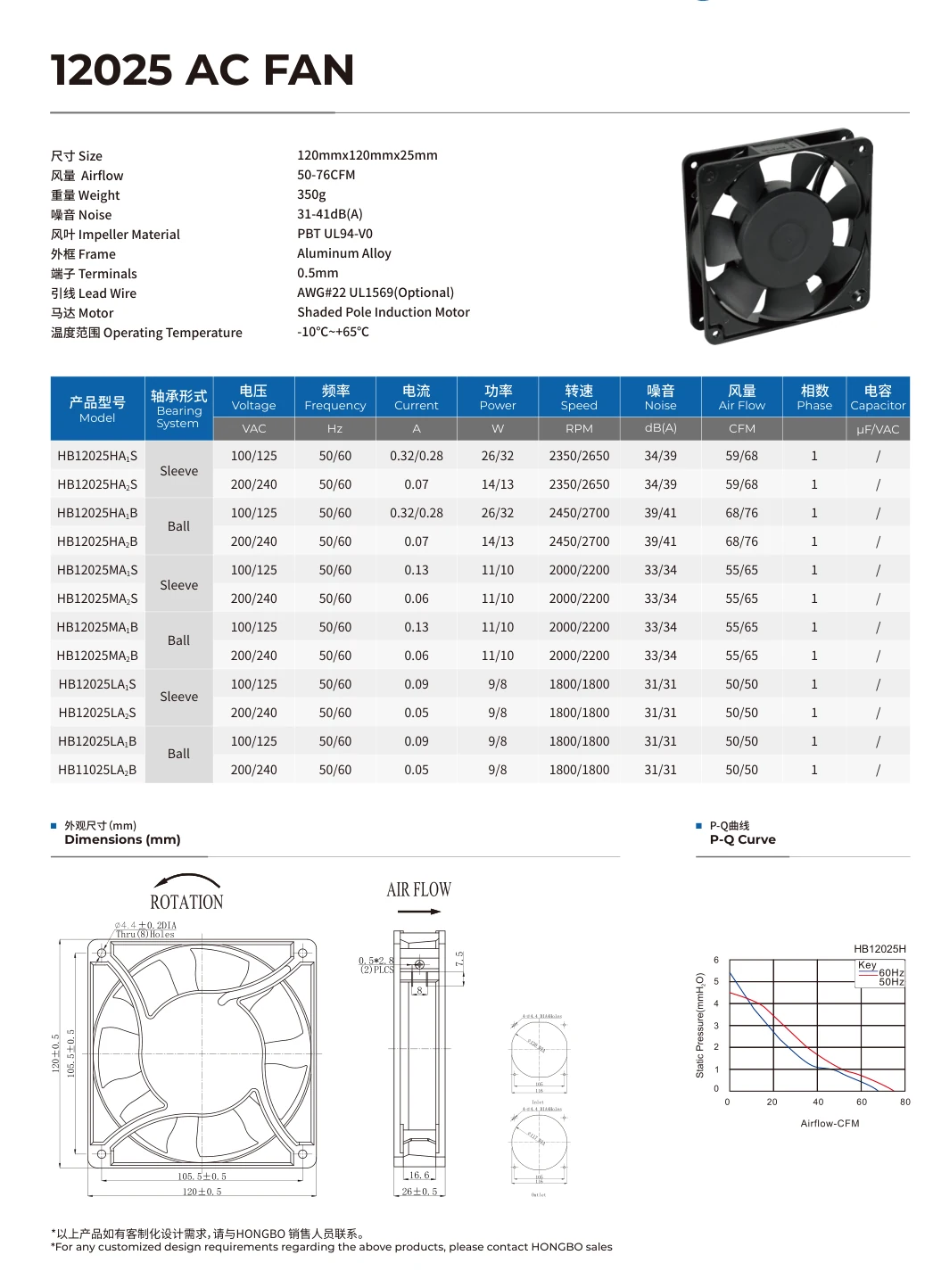
Read a real 12025 fan sheet
The model row identifies the electrical configuration. The outline establishes fit. The P–Q plot helps you decide whether to keep the candidate on your shortlist.
Match the electrical row
The HB12025HA1S row lists a sleeve bearing, 100/125 VAC and 50/60 Hz. Its catalogue airflow entries are 59 and 68 CFM respectively. Keep the full suffix and frequency with the value you record.
Check the drawing before agreeing fit
The catalogue summary calls the frame 120 × 120 × 25 mm. On the same page the side view shows a depth of 26 ± 0.5 mm. The front view shows hole centres of 105.5 ± 0.5 mm. If the opening is tight, request the current drawing for the exact suffix before fixing the cutout.
Compare airflow at the required pressure
For an example target of 40 CFM at 4 mm H₂O, follow 40 CFM up the chart. Both frequency traces on the published HB12025H family plot lie below that pressure at that flow. The catalogue chart does not substantiate this example duty. Request the curve for your exact suffix and supply, or review another model.
Ask for the record that answers the question
Name the model and suffix in every request. Add the installation, supply or market details that determine whether the file applies.
Installation drawing
Use the front and side views to compare hole centers, depth, lead exit and direction. Request the current revision if any catalogue dimension is tight or differs from a nominal size.
Airflow–pressure curve
Match the curve label, supply and frequency or speed. Use the pressure and airflow at the same point. Request the applicable curve if the family chart does not identify the exact suffix.
Sample or test report
Specify the model, sample ID, setup, supply and the acceptance value. The result is useful for approval only when those conditions match your question.
Conformity document
Confirm the full fan marking, electrical variant and destination market. Check the issuer, applicable models and scope in the record you receive.
Select for the equipment the fan will run in
The housing, filter, heat exchanger and duct all change which performance data matters. Record the actual air path before comparing models.
Electrical control cabinets
Check the filter and grille pressure drop, available panel depth, and direction of cooling air through the enclosure.
HVAC and refrigeration
Record the restriction from the coil or duct and the access needed to replace the fan. Compare candidates at the same duty point.
Energy storage cabinets
Define the enclosure air path and ambient conditions. Identify where the final airflow or temperature check will be made.
Air handling units
State the required airflow across the installed filters and heat transfer components, and the pressure condition used for comparison.
Technical references
Read a fan curve
Compare airflow and static pressure together at the relevant supply or speed.
Establish static pressure
List the restrictions included in the pressure value used for your selection.
Review bearings and exposure
Check mounting orientation, the bearing option and exposure to dust or moisture. Confirm the exact suffix and available protection evidence.
Put the shortlist and evidence on one request
Keep the full model, drawing revision, supply, mounting envelope and target airflow at pressure together. If the published configuration fits, request the record needed for approval. If the lead, mounting or geometry must change, send the marked drawing for OEM review.
Frequently Asked Questions
Can I select a fan from frame size alone?
Frame size narrows the search. Confirm the drawing, voltage and control type, then compare performance at the required static pressure.
Why is a catalogue airflow figure different from installed airflow?
An installed fan works against the resistance of the equipment. Use its applicable P–Q curve together with that resistance. Confirm the duty point with the relevant grille, filter or heat exchanger in place.
Which file belongs in the approval record?
Keep the drawing revision and complete part reference next to the sample or test evidence. If a catalogue sheet only identifies a family curve, request the data for the selected suffix and frequency before approval.