Fan Technical Documents

Download catalogue sheets and CSVs, or request the approval file for your exact model.

Catalogue sheets

Each sheet includes a model table, outline drawing and airflow–pressure curve.

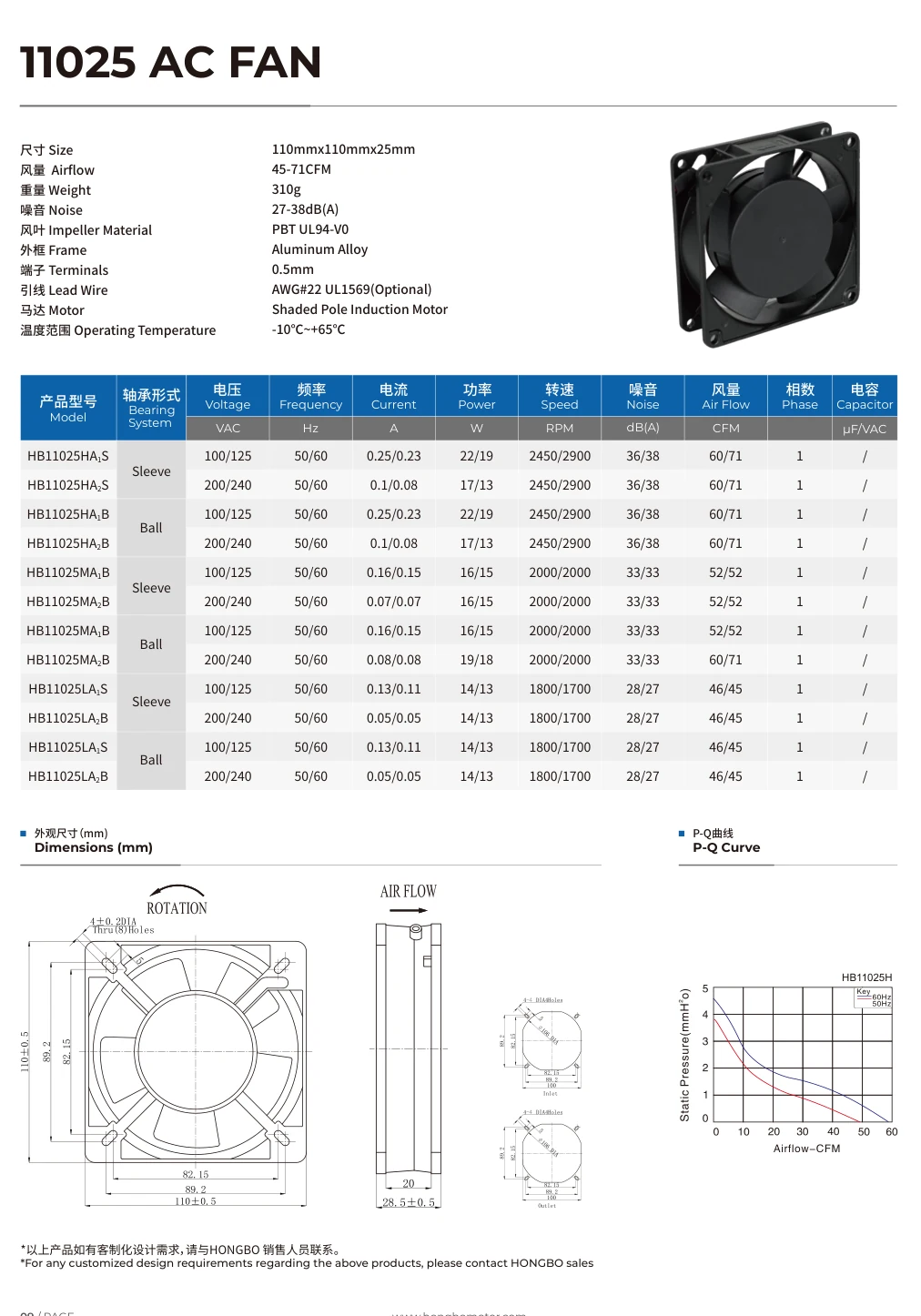
11025 AC

Printed page 09 · WEBP · model table, outline and P–Q curve

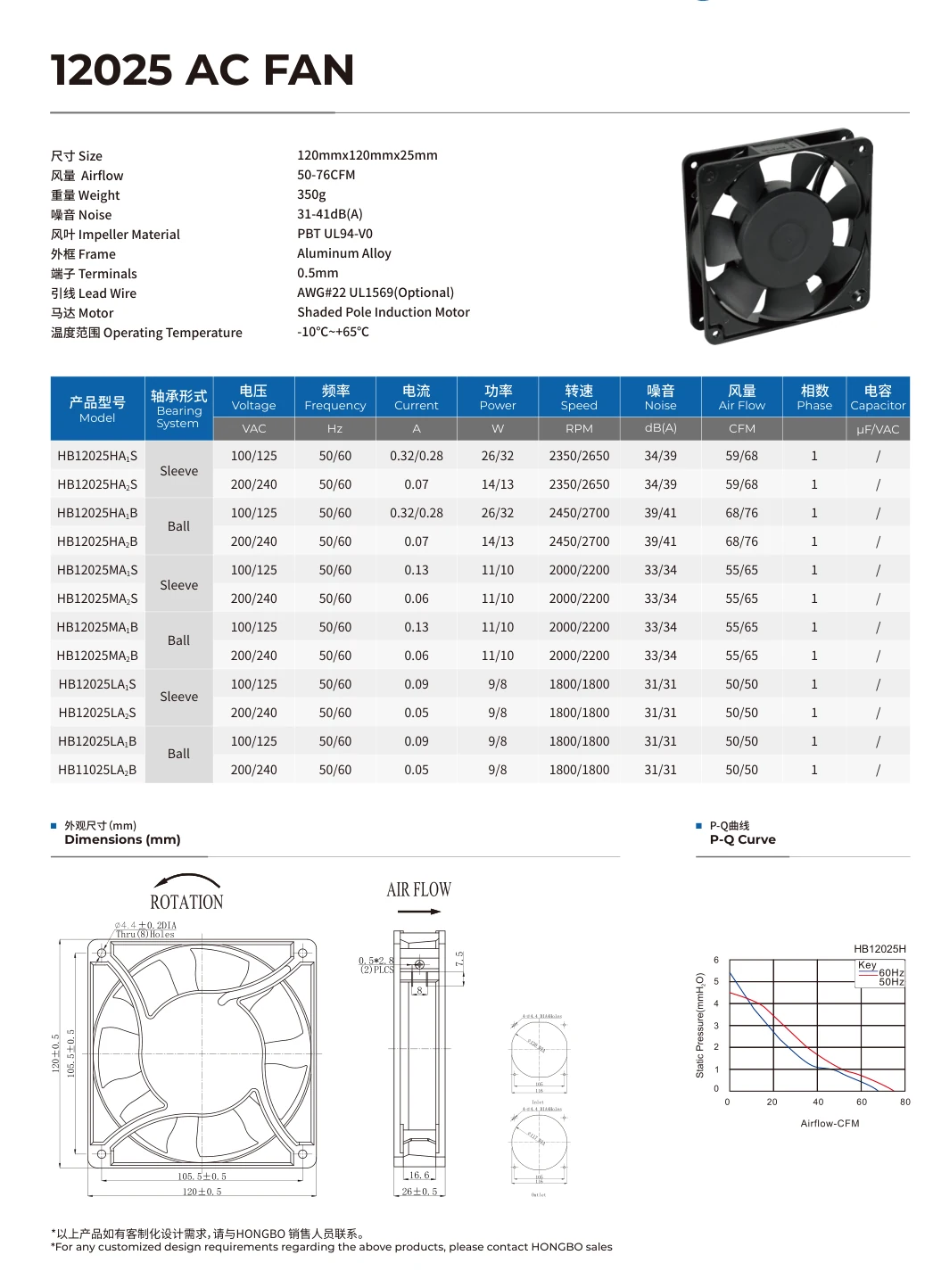
12025 AC

Printed page 10 · WEBP · model table, outline and P–Q curve

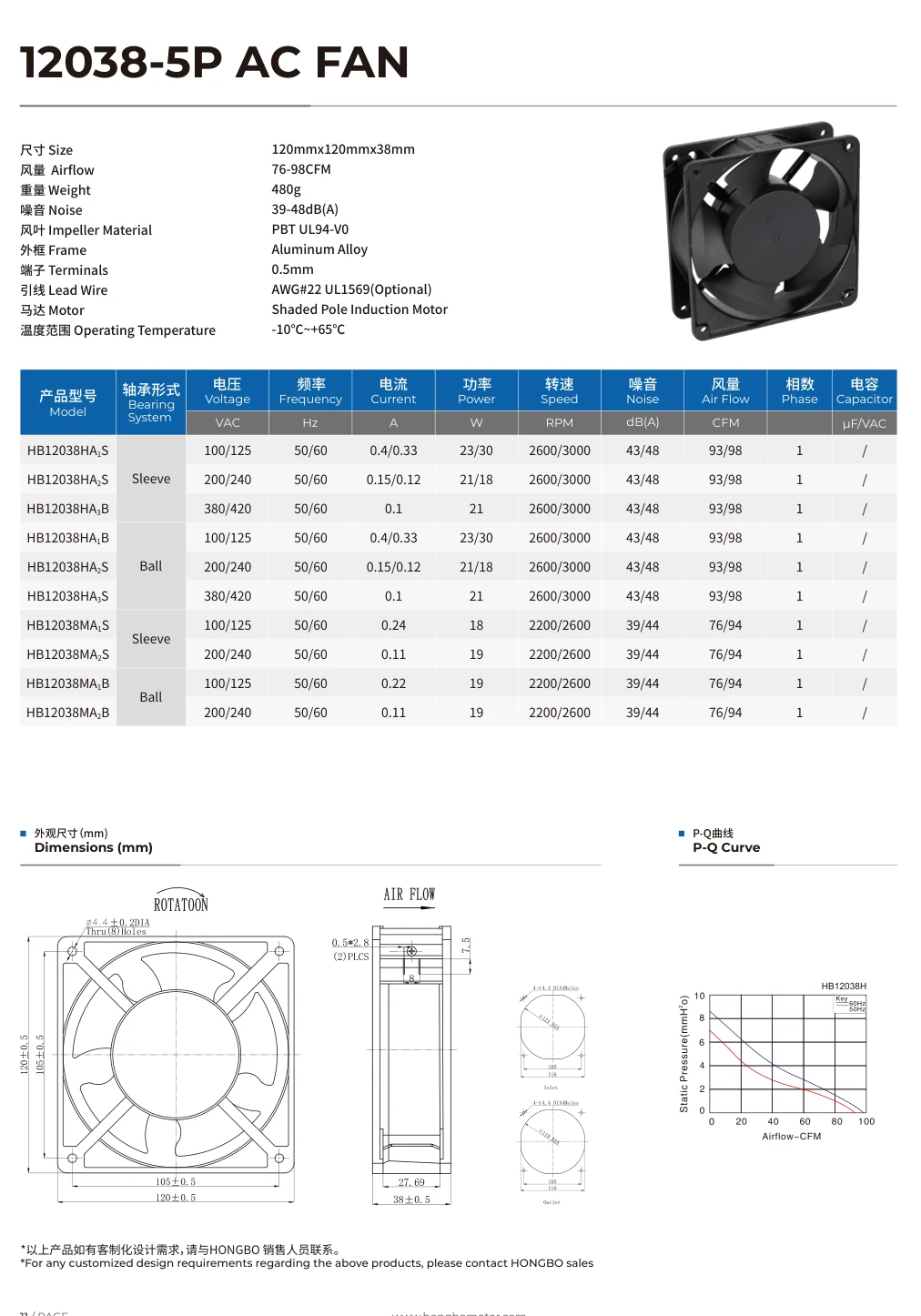
12038-5P AC

Printed page 11 · WEBP · model table, outline and P–Q curve

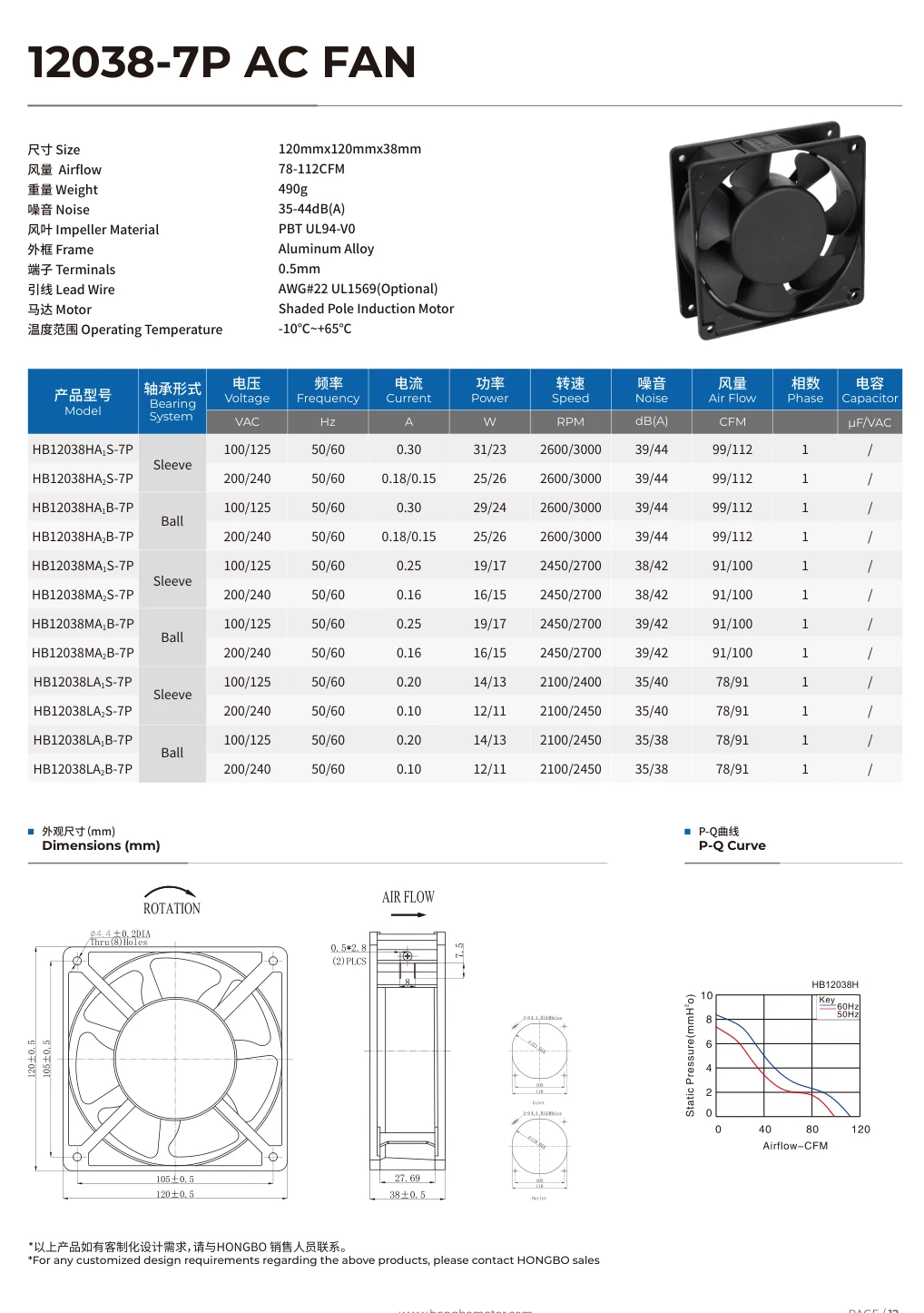
12038-7P AC

Printed page 12 · WEBP · model table, outline and P–Q curve

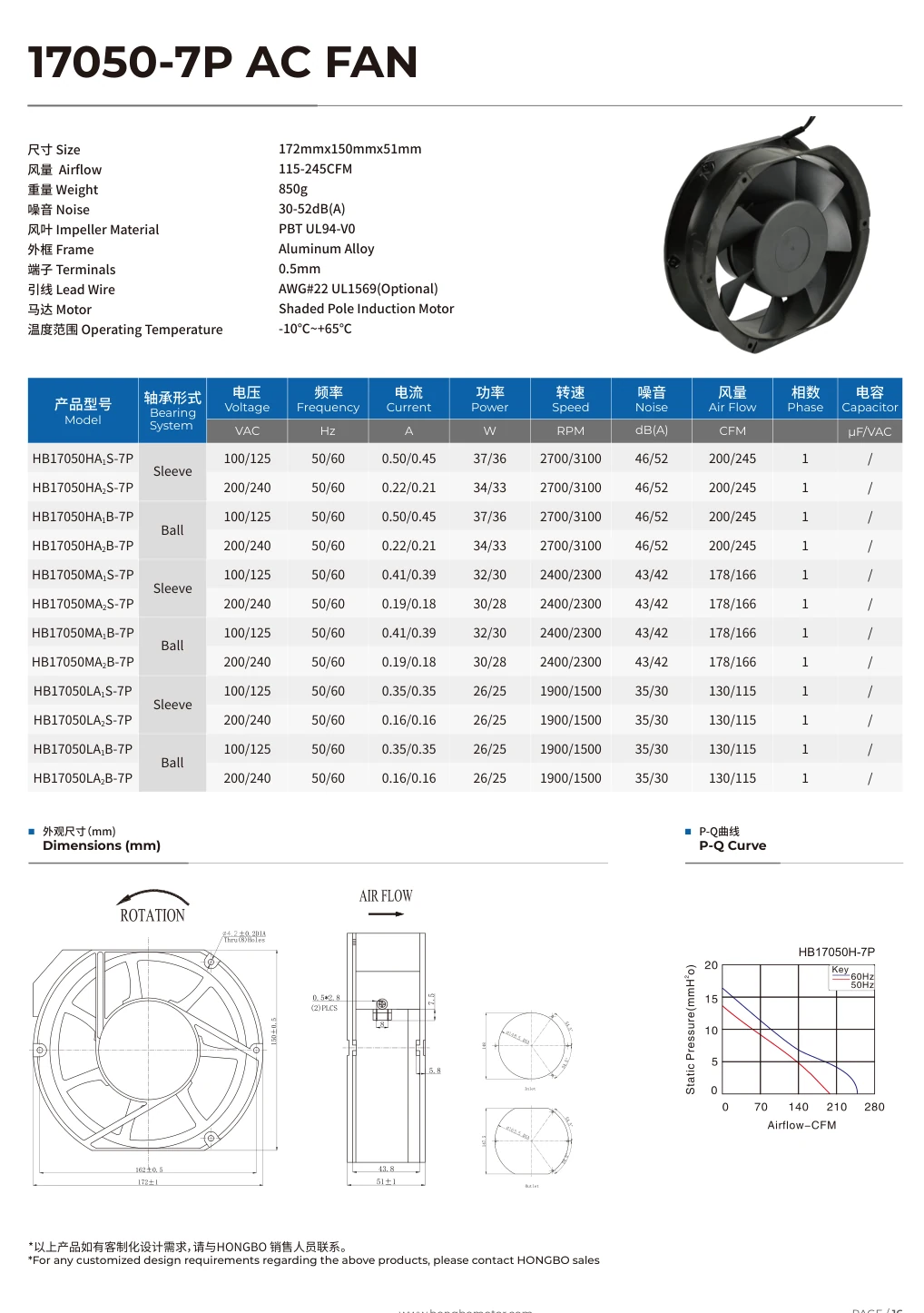
17050-7P AC

Printed page 16 · WEBP · model table, outline and P–Q curve

What is on a sheet?

11025 AC fan, Hongbo catalogue printed page 09. Select to see the source sheet.

Take the shortlist into your project

Use the model index to share the same published product links with your team. Use the worksheet to fill in the equipment opening, electrical input, airflow and pressure, and documents needed for review.

Fan selection worksheet

Fill in mounting, electrical and airflow requirements.

Published model index

49 published product records with dimensions where available and the official model links.

Fan sample approval and change record

Use this blank worksheet after choosing a candidate for a sample. Record the agreed limits and the observed result together so a revised sample or first production lot can be checked against the same conditions.

  • Model suffix, sample ID, drawing and wiring revision
  • Test setup, expected limit, result and decision
  • Open or repeated checks, approver and first affected order or lot

Technical document workflow

Start with the exact fan and the decision the document must support. Use a published sheet for the shortlist, then request the model-specific evidence needed to approve the equipment or order.

01 Identify the exact model

Record the published model and full marking on the fan, including its electrical version. If the part came from the selector, carry that reference into the request.

Take forward A known part and suffix for the document search.
Find the model in the selector

02 Check the published catalogue

Open an applicable catalogue sheet for outline, model rows and performance curves. Save the worksheet if more than one candidate is still under review.

Take forward A catalogue reference and list of questions that still need exact records.

Open the published sheets

03 Choose the evidence you need

Identify the decision to make. Fit and wiring need an outline or wiring record. Duty needs a curve. A sample check or compliance question calls for the applicable report or record.

Take forward A specific document type tied to the approval question.

Compare document types

04 Prepare a traceable request

Select the model and file type. Add the full suffix and the drawing revision, duty point, test setup or destination market that applies.

Take forward A draft request carrying the part reference and the information needed to review it.

Build the document request

05 Resolve scope and revision differences

When the returned record differs from the catalogue or installed part, identify the field and revision in question. Confirm which drawing, curve or model scope applies before approval.

Take forward A confirmed document for the exact part and condition.

See the 12025 drawing example

06 File the record with the purchase

Keep the approved revision and sample identifier with the exact part on the order. Refer to the same record for receiving or reopen the affected check if the marking changes.

Take forward An approval and order reference that engineering and purchasing can both check.

Review what to retain

Match the file to the fan before release

For a 12025 project with limited depth, keep the catalogue extract as the shortlist reference. Ask for the current drawing for the installed suffix before the final opening or order is approved.

Available now
The original printed page 10 shows the table, outline and family airflow–pressure graph. Use it to mark the dimension or operating point that needs confirmation.
Request for approval
Include the full suffix and the actual available depth. Mention the 25 mm nominal summary and 26 ± 0.5 mm side-view dimension so the request identifies the discrepancy. Ask for the current drawing revision and the dimension reference surface.
Keep with the purchase reference
After checking the returned revision against the sample and equipment, carry the approved revision and part reference onto the order. Where a test report or declaration is required, retain its applicable model scope and conditions with the same record.

Choose the file you need for approval

A catalogue sheet can narrow the shortlist. For production approval, ask for the record that identifies your exact variant and the conditions or revision used for the decision.

Hongbo 12038-7P AC fan catalogue sheet, printed page 12, including drawing and performance curves.
12038-7P catalogue drawing example

Agree mounting or wiring

Specify the full model, drawing revision if known, hole pattern and desired connector. Check the received outline, side view and wiring against the equipment.

Hongbo 17050-7P AC fan catalogue sheet, printed page 16, including drawing and performance curves.
17050-7P catalogue curve example

Verify airflow at pressure

Give the supply or speed setting and both values in your duty point. Check that the selected curve applies to the exact suffix and stated conditions.

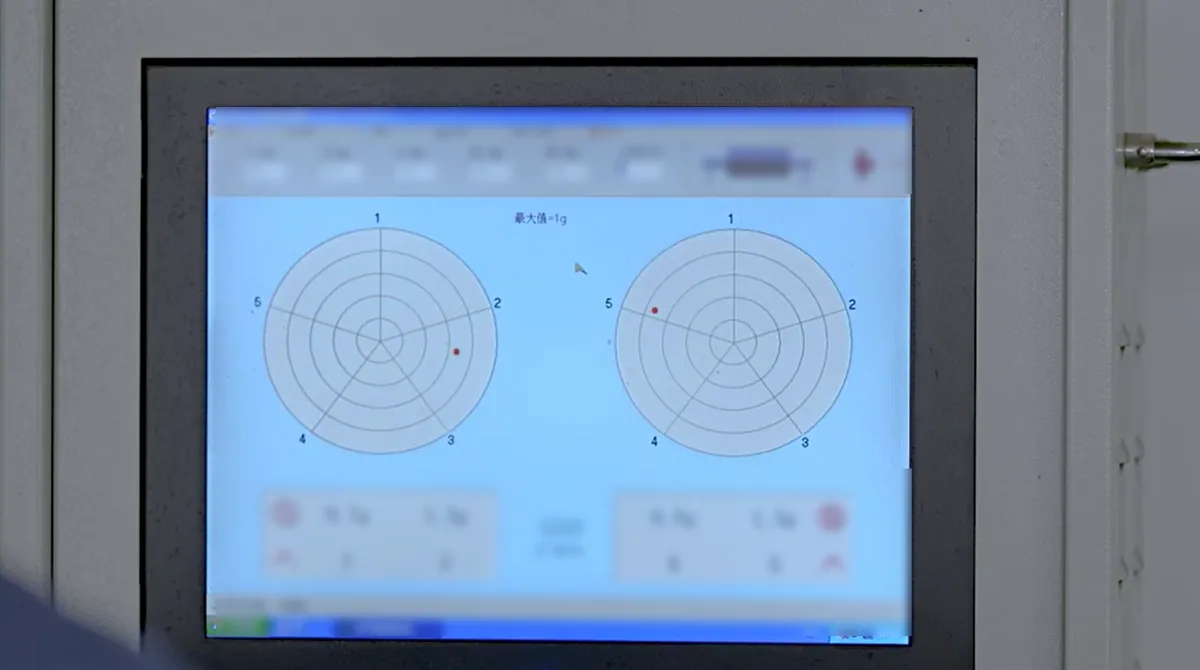
Balance measurement screen with readings obscured
Balancing measurement display

Approve a tested sample

Identify the sample, the measurement needed, the setup and the acceptance value. Compare the report to the same test and sample identifiers.

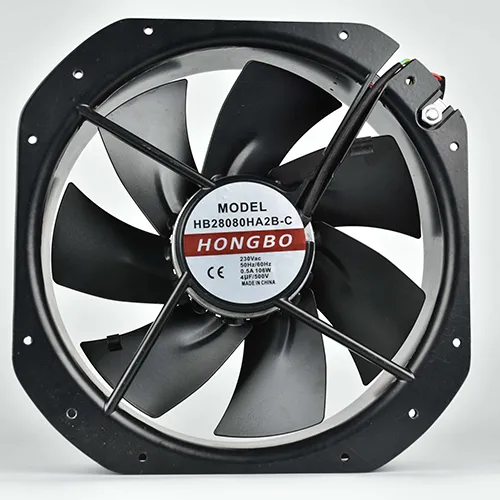
AC28080 (1)
28080 label example for checking document scope

Check compliance coverage

Give the full marking, voltage variant and destination market. Review the model scope and issuer in the document you receive.

Write a request that identifies the exact file

Choose the document that answers the open question on your shortlist. Start with a model in the selector or select one in the request form below. Include the full suffix seen on the label, the equipment or project reference, and the decision the file needs to support.

The published 11025, 12025, 12038-5P, 12038-7P and 17050-7P sheets are available above for initial comparison. A model-specific drawing, curve, sample report or conformity record can require a separate request.

Installation drawing or wiring record

A useful request states the model, suffix and drawing revision if known. For 12038-7P, identify the dimension you need to approve, such as installed depth, hole centers, hole diameter or lead direction. Include the allowed envelope or the dimension in question.

If the issue is wiring, state the supply and which connector, pin assignment or lead termination you need to confirm. Open the email draft and attach a marked outline, connector photo or existing wiring information.

Airflow and static-pressure curve

Provide the airflow and static pressure as a pair, with units, plus the required supply, frequency or speed setting. For a filtered enclosure, identify the filter state and whether the pressure is measured or estimated. This makes the request specific enough to match the data to your operating condition.

If you need two operating conditions, list both explicitly. Keep the applicable curve label and suffix with the chosen condition when you file the response.

Model or sample test report

State the sample reference, full part number, measurement, setup and acceptance requirement. For instance, specify whether you need airflow with a fixture installed, electrical performance at a stated supply, or vibration under a stated mounting condition. Identify the condition in which the result will be used.

If you already have your own test plan, include the relevant acceptance values and explain who carries out each part. Request the report tied to the agreed sample and method.

Conformity record for a destination market

Send the exact model marking, electrical variant and destination market. Indicate whether you are checking component documentation or preparing documentation for the final equipment. Ask for the relevant document version and scope for the fan you intend to buy.

Check the issuing source and model scope against the marking. When an issuer provides a searchable record, use its file number and exact model to confirm the applicable entry.

Prepare a request for the exact variant

Choose the published model or follow Request files in the selector to prefill it. Add the complete suffix from the label and choose a drawing, curve, test report or conformity record.

Tell us the installation or market and which decision depends on the file. Open the email draft to attach a label photo, drawing or marked test requirements before sending.

Check the record against your purchase

Check that the drawing, curve or declaration covers the part that will be ordered. File the approved record alongside the accepted sample and purchase reference.

Match the complete marking

Compare the full suffix, voltage, frequency or speed with the exact fan you are reviewing.

Match the acceptance condition

Keep the drawing revision, relevant operating point or conformity market with the file. Ask for clarification if any of these differ from the purchase requirement.

Give buying one part reference

Use the same model and revision in the approval record and order. Carry the attachment with the parts list and sample sign-off.

Resolve a discrepancy before approving the drawing

In the published Hongbo 12025 example, the catalogue summary says 120 × 120 × 25 mm and the side view on that sheet gives 26 ± 0.5 mm. A buyer can still use the catalogue to find the family. An engineer with a tight opening needs the current outline for the exact suffix before releasing the design.

A drawing revision, performance condition and compliance scope each answer a different question. Carry the applicable identifier through the file request, sample approval and purchase record.

Identify which value controls the decision

Record the catalogue page and dimension that caused the question. Include your actual allowable depth with the grille, gasket and cable bend if those affect the fit. Ask for the current outline of the candidate and identify the surface from which the dimension is measured.

For an electrical or performance discrepancy, identify the label and test condition at issue. A drawing, curve or report needs to match the exact variant before you use it to settle the discrepancy.

Approve the record against an identified sample

When the drawing arrives, record its revision and compare the relevant dimension with an identified sample in the equipment. Keep the measurement setup and any accepted exception with the result. Use the same part and revision in the approval reference.

For a report, tie the test conditions and results to the same sample identifier. For a conformity document, keep the issuer, file number and model scope alongside the marking you reviewed.

Give receiving the same identifiers

The order should carry the exact part reference and the applicable agreed revision. Keep the label or carton reference where receiving uses it to verify the delivered configuration. Store the published catalogue extract with its original purpose as a reference for shortlisting.

If a later delivery carries a different marking or revision, compare the change with the approved record and reopen the affected check. That preserves the evidence for the purchase even when several revisions circulate.

Frequently Asked Questions

The five published catalogue sheets cover 11025, 12025, 12038-5P, 12038-7P and 17050-7P. The two CSVs are the selection worksheet and the published model index.

Open the model selector and use Request files on the desired result. The request form carries its published reference. Add the full suffix and required document.

If the project requires a controlled drawing or test record, request the applicable revision for the exact configuration and keep it with the identified sample.

Scroll to Top

Get A Free Quote Now !

Contact Form
If you have any questions, please do not hesitate to contact us.
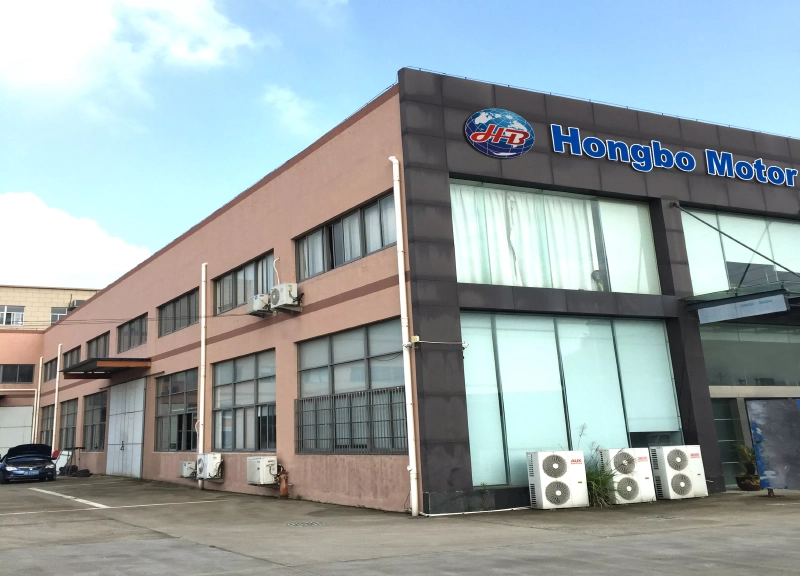
changfang